Keep Vulnerability Scanners Off Your IIS Servers
Recognizer spots the bots that probe your sites for /wp-login.php, /.env and /.git/config, and blocks their addresses inside IIS, with no added delay for real visitors. $10, paid once, covers every server you run. The first 30 days are free.
What is Recognizer?
Every public web server gets scanned. Bots work through lists of addresses and ask each server for WordPress login pages, phpMyAdmin, .env files, Git folders, backup archives and web shells, in the hope that one of them exists. Each of those requests runs through your application and fills its logs and error reports, and now and then one of them finds a file that should never have been reachable.
Recognizer is a request filter for Microsoft IIS on Windows Server that takes those bots off your sites. On a server that runs ASP.NET, no visitor has a reason to ask for /wp-login.php, so an address that does is a scanner. Recognizer blocks it for as long as the rule says, which is 30 days in most of the starter rules. While the block lasts, the scanner gets a plain 404 for every request and your application does not see it at all. Real visitors notice nothing, because the only work Recognizer does on their requests is an in-memory address lookup.
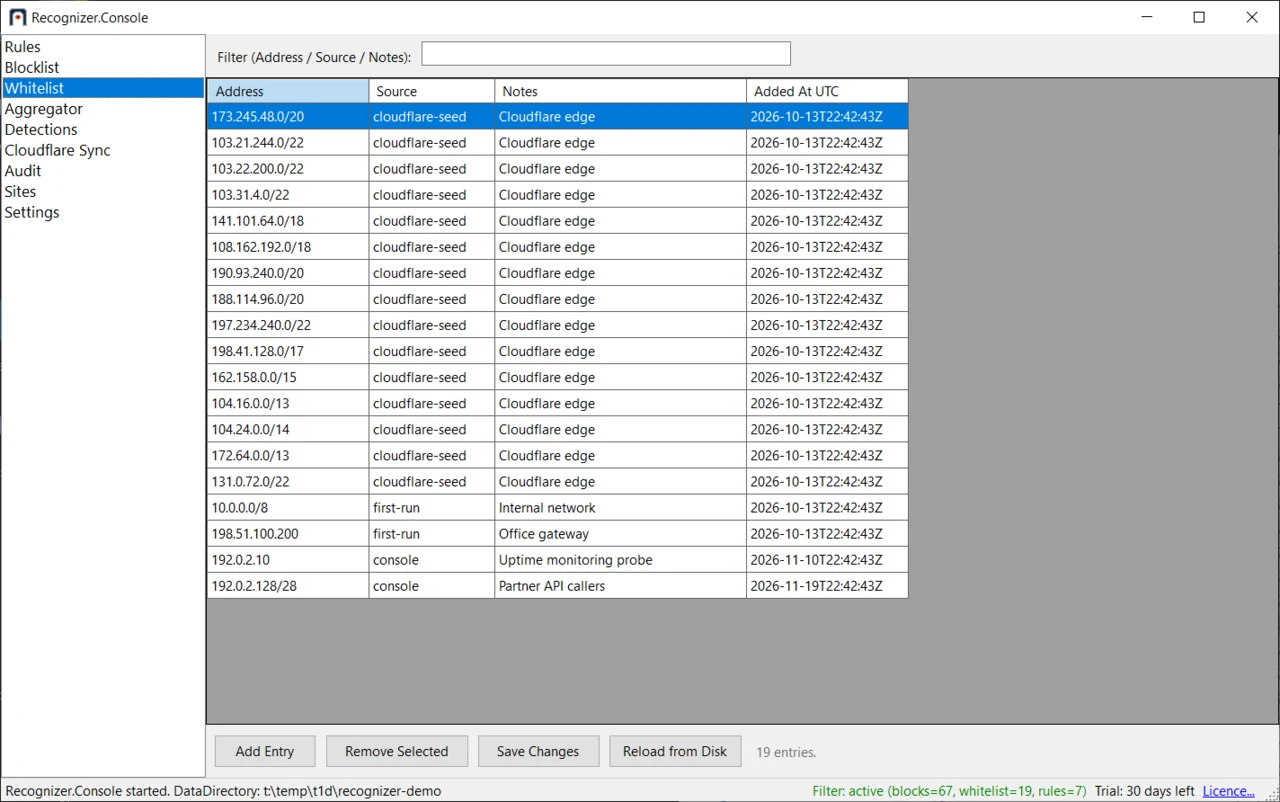
It comes in two parts. The Filter is a native IIS module that does the blocking inside the web server, with no proxy in front of your sites and no extra service to run. The Console is a desktop application on the server, where you edit rules, manage the blocklist and whitelist, and watch detections arrive live. Everything is stored in JSON files on the server, with no database and no external service. We ran Recognizer on our own production servers for months before releasing it.
How It Works
Step 1
A scanner asks for a probe path
A bot requests /wp-login.php, /.env or /phpmyadmin. Your site answers this one request as usual, because Recognizer checks paths in the background and never holds a request up to do it.
Step 2
Recognizer blocks the address
A worker thread matches the path against your rules. On a hit, the address goes on the blocklist for the duration set in the rule, and the detection shows up in the Console.
Step 3
Every later request gets a 404
From its second request on, the scanner receives a plain 404 for everything it asks of a protected site, and your application is not invoked. The block lifts by itself when it expires, or earlier if you remove it.
Features
Scanner Detection
Rules That Already Know What Scanners Ask For
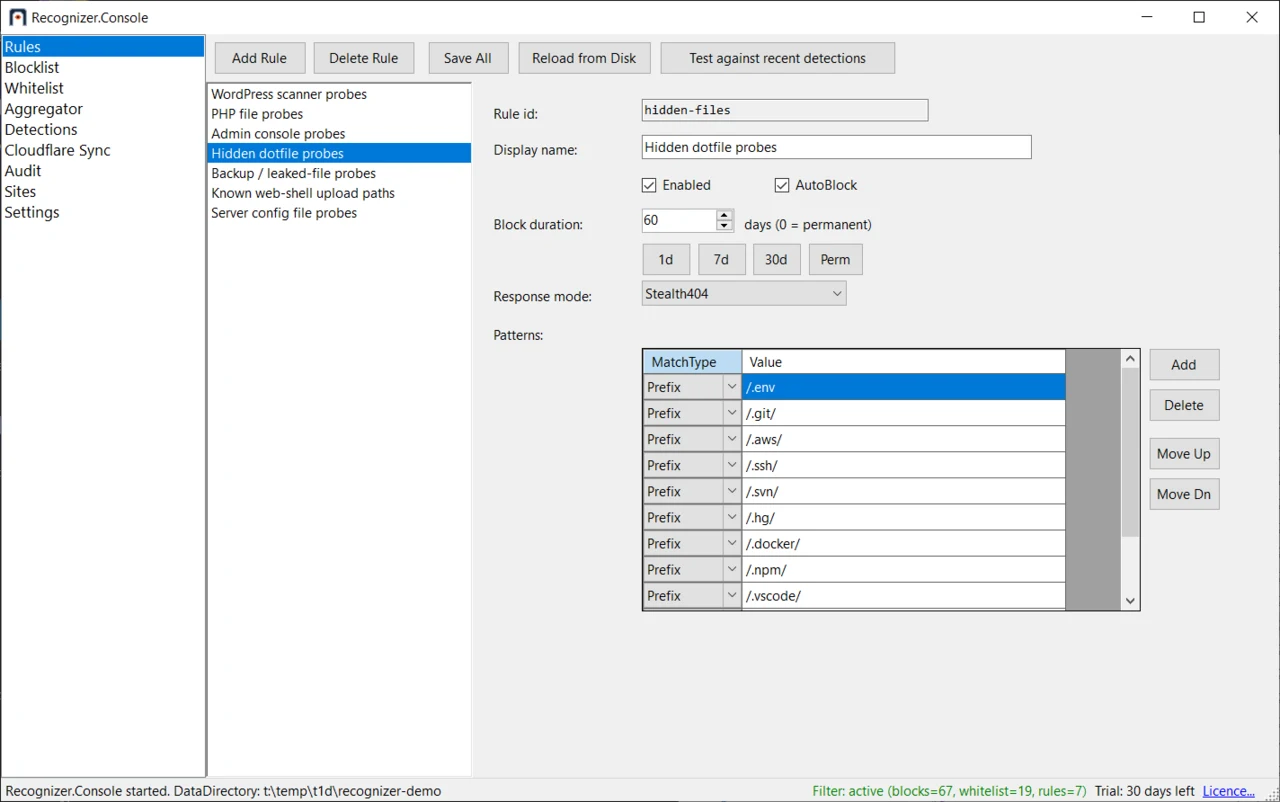
Recognizer ships with 7 rules for the requests that fill the logs of every public server. They cover WordPress probes, PHP files, admin consoles such as phpMyAdmin, hidden dotfiles such as /.env and /.git/, backup and leaked files, known web shells, and server config files. The rules are active as soon as you switch a site on, and every one of them is yours to edit. Each rule has its own block duration and its own auto-block switch, so a new rule can log its hits for a while before it is allowed to block anyone. Rules read the request path and ignore the query string on purpose, which means a scanner cannot slip past one by adding a random parameter.
- 7 starter rules, all editable
- Prefix, suffix, exact and contains patterns on the request path
- Query strings are ignored, so a rule cannot be dodged by appending parameters
- Block duration per rule, from 1 day to permanent
- Auto-block can be switched off per rule to log hits only - the backup-file rule ships that way, because many sites serve .zip downloads
- Test a rule against recent detections before saving it
- Rule changes reach the Filter without restarting IIS
Automatic Blocking
Blocked Inside IIS, with No Delay for Visitors
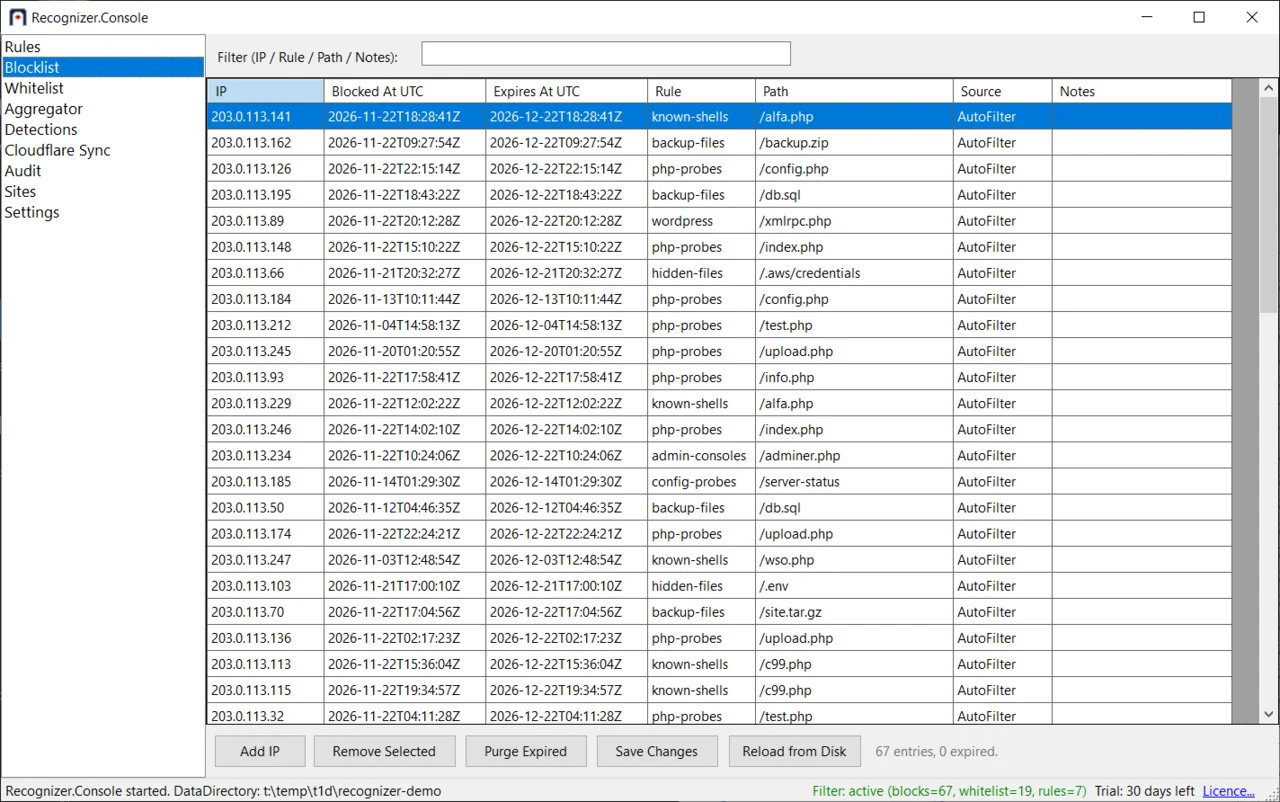
The Filter is a native IIS module that runs in the worker process itself, so there is no proxy in front of your sites and no extra hop for your traffic. For each request to a protected site it looks the client address up in an in-memory whitelist and blocklist, and that lookup is all a visitor ever waits for. Matching paths against rules happens afterwards on a worker thread. A blocked address gets a plain 404 before your application is invoked, with no block page and no added header, so to a scanner the server looks like an empty site.
- Native IIS module, with no proxy or separate service in front of your sites
- One in-memory address lookup per request, with rule matching kept off the request path
- Blocked addresses receive a plain 404 and never reach your application
- Blocks expire by themselves after the duration set in the rule
- Behind Cloudflare or another reverse proxy, the real client address is read from the proxy header, and only for requests from a trusted proxy range
- If the Filter ever hits an internal error, the request is passed on to the site
Detections and Audit
See Every Block as It Happens
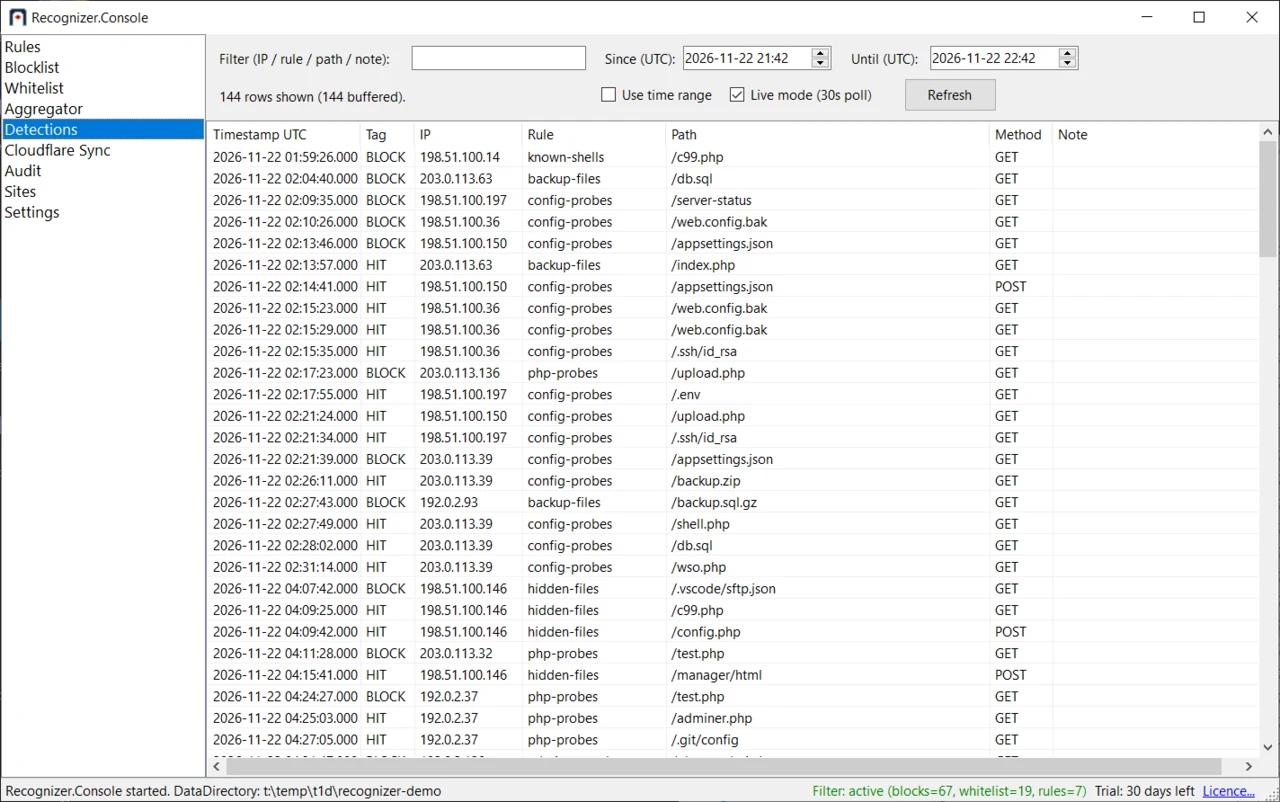
The Detections page shows each block and rule hit as it happens, with its time, IP address, rule, requested path and HTTP method. Filter the log by any text, or narrow it to a time range when you are following one address. The Audit page records every change made in the Console to rules, blocklist, whitelist and settings, with who made it and when, and exports to CSV when you need the record elsewhere.
- Live log of blocks and rule hits
- Filter by IP, rule, path or note, with an optional time range
- Audit log of every change to rules, blocklist, whitelist and settings
- Audit export to CSV
- Status bar shows that the Filter is active and how many blocks, whitelist entries and rules it has loaded
Subnets and Cloudflare
Stop Whole Subnets at the Cloudflare Edge
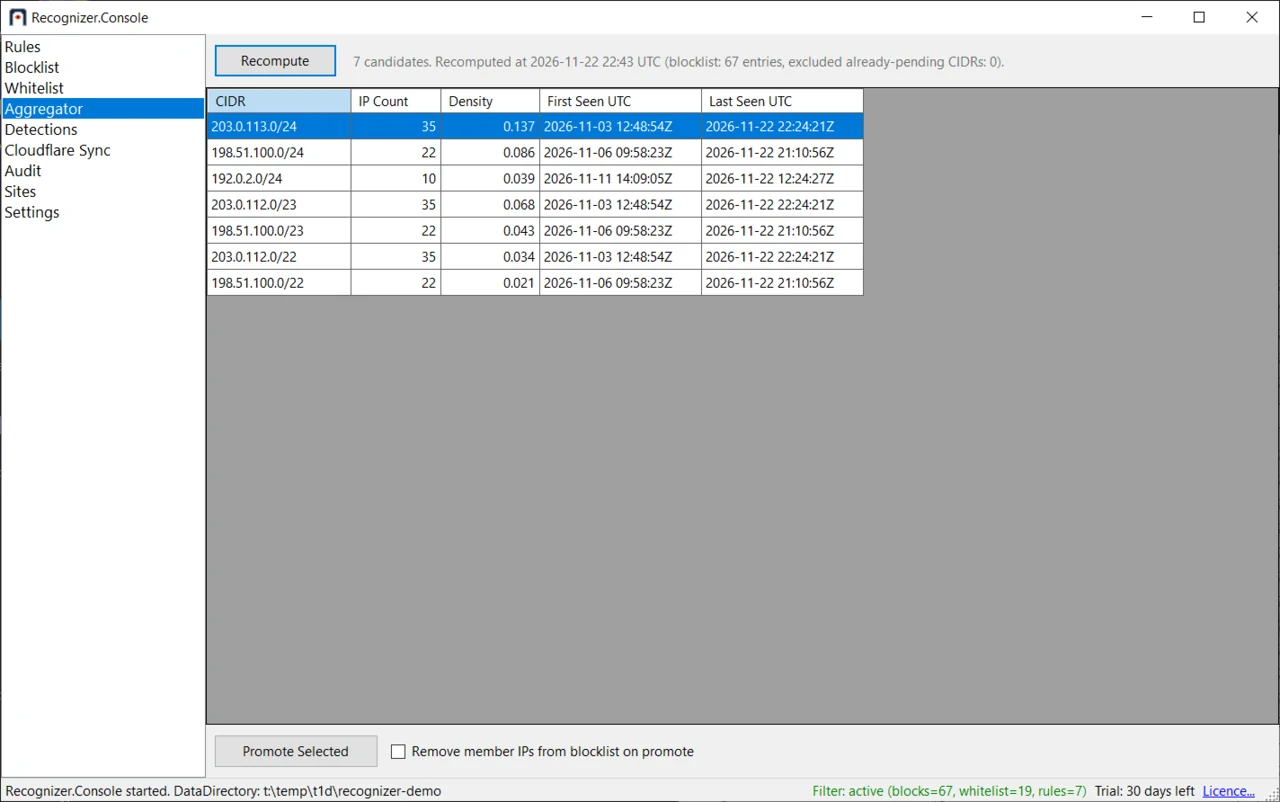
When a scanner rotates through the addresses of one subnet, blocking single addresses is always one step behind. The Aggregator finds the subnets that hold many blocked addresses and lists them with the evidence, and you decide which ranges to act on. If your sites are behind Cloudflare, the Console pushes the ranges you approve to a Cloudflare IP list, so a Cloudflare rule can drop that traffic at the edge before it reaches your server. The sync is optional and stays off until you set it up.
- Finds /24, /23 and /22 subnets with many blocked addresses
- Shows the address count, density, and first and last seen time for each candidate
- You approve each range, and nothing is promoted automatically
- Optional sync of approved ranges to a Cloudflare IP list
- The Cloudflare API token is stored encrypted with Windows DPAPI
Safe to Roll Out
Switch It On One Site at a Time
After installation no site is filtered. You switch sites on one by one, on the Sites page of the Console or with one line in the site's web.config, and every other site on the server is left alone. In dry-run mode the Filter logs what it would have blocked without blocking anyone, so you can judge the rules against your own traffic before they act. Addresses and ranges on the whitelist are never blocked, and on its first start the Console offers to whitelist the server's local subnets.
- No site is filtered until you switch it on
- Opt-in on the Sites page or with one line in web.config: <recognizer enabled="true" />
- Dry-run mode logs what would be blocked and blocks nothing
- Whitelist of single addresses and CIDR ranges, each with a note
- First-run dialog offers the server's local subnets for the whitelist
- The installer adds the Cloudflare ranges as trusted proxies
- Switch a site off again, or the whole Filter, without restarting IIS
Self-Contained
Everything Stays on Your Server
Rules, blocklist, whitelist and settings are plain JSON files in one data folder, which makes them easy to back up and easy to read. Recognizer needs no database, depends on no external service, and has no account and no telemetry. For security reasons it has no updater either, so nothing inside your web server downloads code or checks for versions. The Console includes its own .NET runtime, and the Filter is never licence-gated, so the blocking does not depend on the state of a licence.
- State is kept in JSON files in one folder on the server
- No database, no external service, no account
- No updater and no version checks - a new build is installed when you decide
- The Console includes the .NET runtime, nothing to install separately
- The Filter is never licence-gated and is not time-limited
Built This Way on Purpose
Recognizer is deliberately narrow in what it does. These are the choices behind that, and what each of them gives you.
One Address Lookup per Request
A web application firewall inspects every request in full, and every visitor waits while it does. Recognizer is not a WAF. On the request path it checks one thing, whether the client address is blocked, which is why it works in real time and adds no delay to a request. Its job is to take scanners off your servers, and it is not a substitute for keeping those servers and their applications patched.
Reads the Path and Nothing Else
Rules look at the request path and the client IP address. Request bodies and query strings are never inspected, so Recognizer does not read uploads, form posts or anything else your users send, and the work it does is the same for a small request and a large one. Scanners identify themselves by the path they ask for. The query string is the part of a request that is easiest to vary, and a rule that ignores it cannot be dodged by changing it.
IPv4, Where the Scanning Comes From
Recognizer blocks IPv4 addresses. On our own servers the overwhelming majority of scan traffic arrives over IPv4, and an IPv4 address is a single 32-bit key, which keeps the lookup on every request small and fast. Requests that arrive over IPv6 are not filtered. They pass straight through to the site, so an IPv6 visitor is never delayed and never blocked by mistake.
Updates Only When You Install Them
For security reasons, Recognizer never updates itself. A module that runs inside your web server should not download and install code on its own, so there is no updater, no background service and nothing that contacts a server to check for versions. That removes a whole class of attack surface, and a new build reaches your servers only when you have decided to install it.
$10 for All Your Servers
One-time payment
$10
Per customer, not per server and not per site. One licence covers every server you own or operate.
Licence sales open soon.
The first 30 days are free.
-
One licence covers every server
A licence is issued to a person or a company, never to a machine. Install Recognizer on every server you own or operate and protect every site on them. The price stays $10.
-
Pay once, keep it
The licence is perpetual. There is no subscription and nothing to renew, and updates to version 1 are included.
-
No hardware lock
Replace a server, rebuild a VM or move to another host, and the same licence keeps working.
-
30 days free with everything switched on
Download it and use every feature for 30 days, without registering. That is long enough to see what it does to the scanner traffic on your own servers before you pay anything.
-
Your protection does not depend on the licence
The licence unlocks the Console. The Filter is never licence-gated and is not time-limited, so it keeps blocking scanners whatever the licence state is.
Full terms are in the end user licence agreement, which the installer also shows before installing.
Frequently Asked Questions
Get Recognizer Today
Free for 30 days with every feature and no registration. After that it is $10, once, for every server you run.
Download for Windows
v1.0.0 40.9 MB Windows Server 2019, 2022, 2025 with IIS (x64)
The 1.0 installer is not code-signed, so Windows SmartScreen may show a warning. SHA-256: b4d862fd04868e037498577300cb6ef6d8c90760b44643d7d81398cce1a718fc
What the installer does
It asks for administrator rights, shows the licence agreement, and installs the Filter and the Console together. IIS is stopped while the module is registered and started again afterwards, so run the installer at a quiet moment. After that no site is filtered until you switch it on, on the Sites page of the Console or with one line in the site's web.config.
Requirements
Windows Server 2019, 2022 or 2025 (x64) with IIS, and the Microsoft VC redistributable for Visual Studio 2015-2022 (x64), version 14.44 or later. If it is missing, the installer stops without changing anything; it is available from Microsoft. The Console includes its own .NET runtime.